Author: admin

  • Retail Footfall Analytics in India: A 2026 Playbook for Store Operators

    Retail footfall analytics in India has moved from a big-format luxury to an operational baseline. As organised retail expands across tier-1 metros and fast-growing tier-2 cities, store operators can no longer run promotions, rosters, and layouts on intuition alone.

    The cameras are already on the wall; what changes in 2026 is the ability to turn that existing CCTV feed into reliable counts, conversion signals, and staffing decisions — without a costly hardware refresh and without compromising customer privacy.

    This playbook explains how retail footfall analytics works in the Indian context, the metrics that matter, the privacy obligations under the DPDP Act, and a practical rollout sequence you can follow across a multi-store estate.

    Why retail footfall analytics matters more in India in 2026

    Indian retail is uniquely seasonal and uniquely diverse. A single chain may run flagship stores in Mumbai or Bengaluru alongside compact outlets in Jaipur or Coimbatore, each with different traffic rhythms.

    Festive peaks — Diwali, Eid, regional new-year sales — can swing daily footfall by multiples, and a roster built for an average week collapses under a festive Saturday.

    Footfall analytics replaces guesswork with an hourly demand curve per store, so managers staff the floor to actual traffic rather than to a fixed shift template.

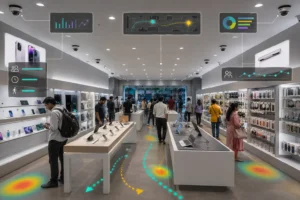
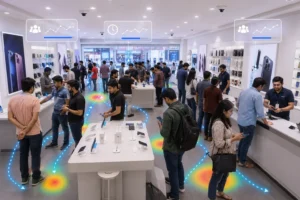
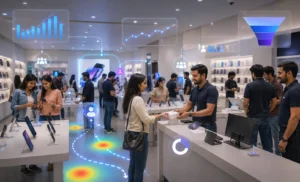
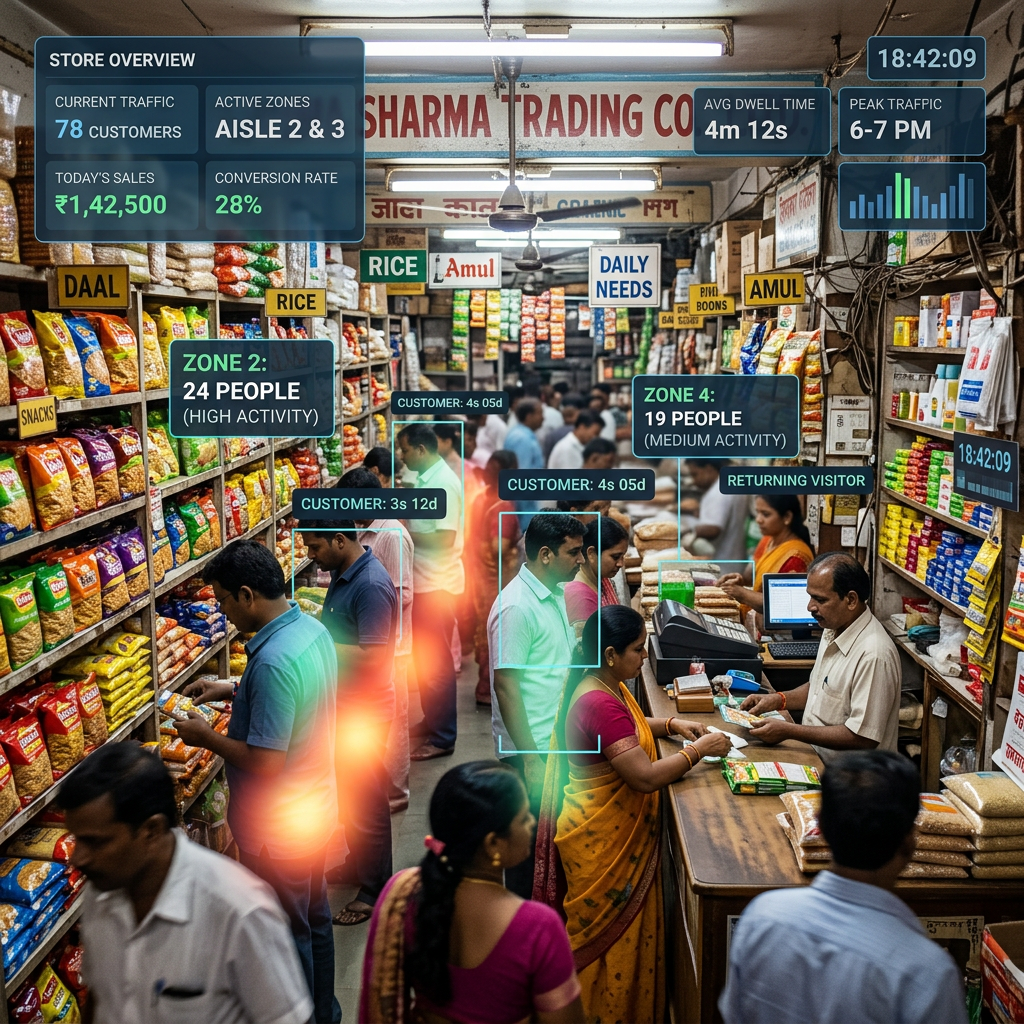
    Inside a busy retail store showing customers shopping with analytics data overlays including customer count, zone activity, sales, and time
    A busy retail store with real-time customer activity and sales data overlays

    The second pressure is margin. With rents and staffing costs rising in prime high streets and malls, operators need to know not just how many people entered, but how many converted.

    A store that pulls heavy footfall yet converts poorly has a layout, staffing, or assortment problem — and footfall data is what lets you tell those apart.

    How footfall counting works on your existing cameras

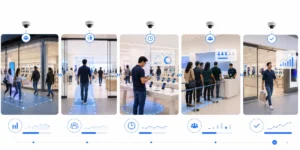
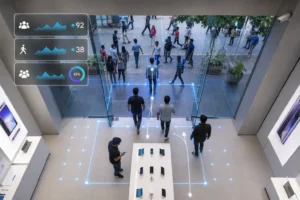
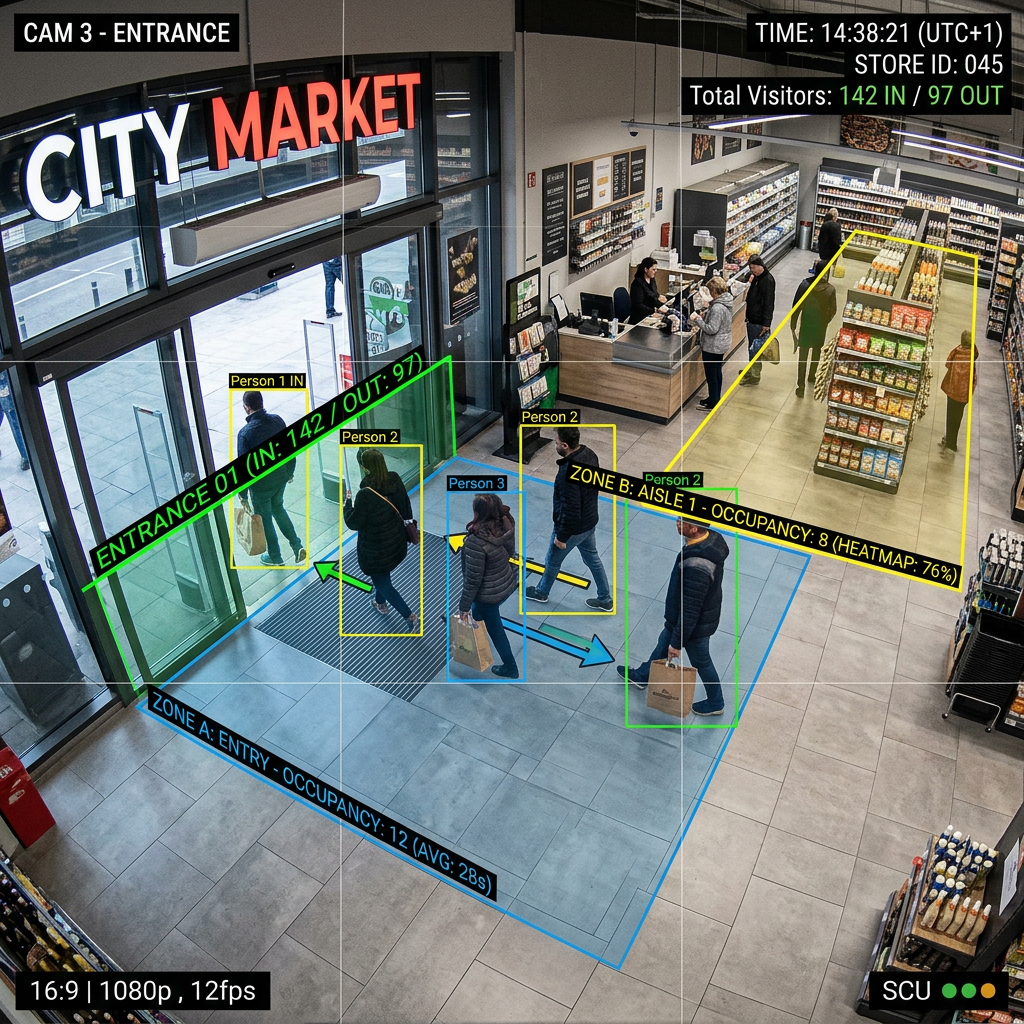
    Supermarket entrance with customers tracked by foot traffic and occupancy monitoring system
    People entering and shopping inside City Market with visitor tracking overlays

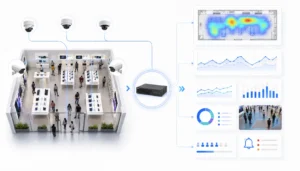
    Modern video AI does not require specialist sensors or door-mounted beam counters. It reads the feed from cameras you already operate.

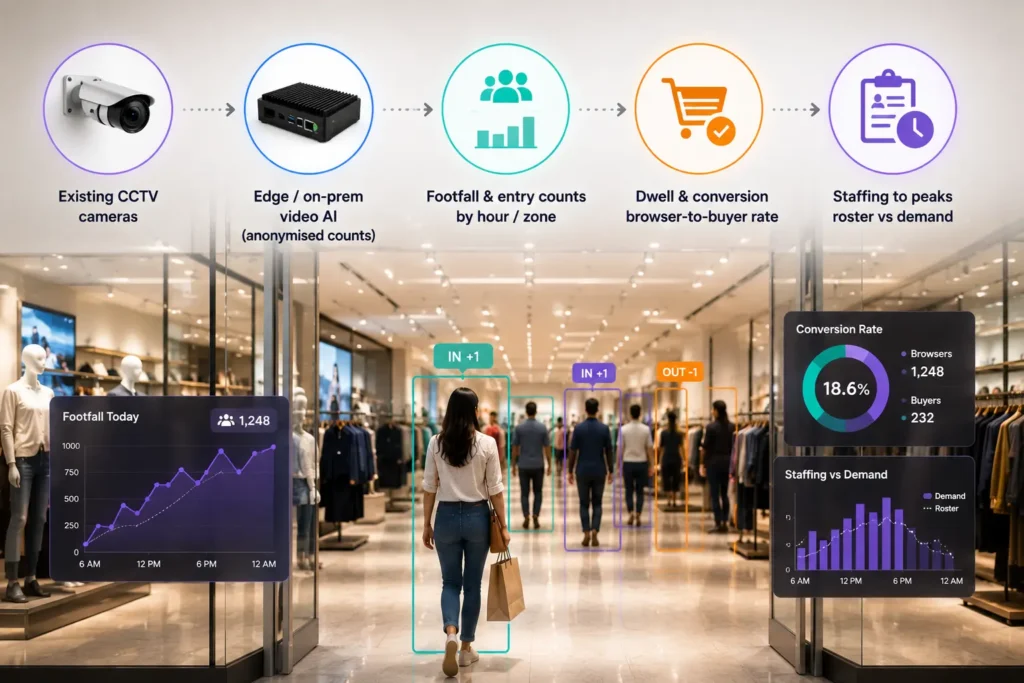
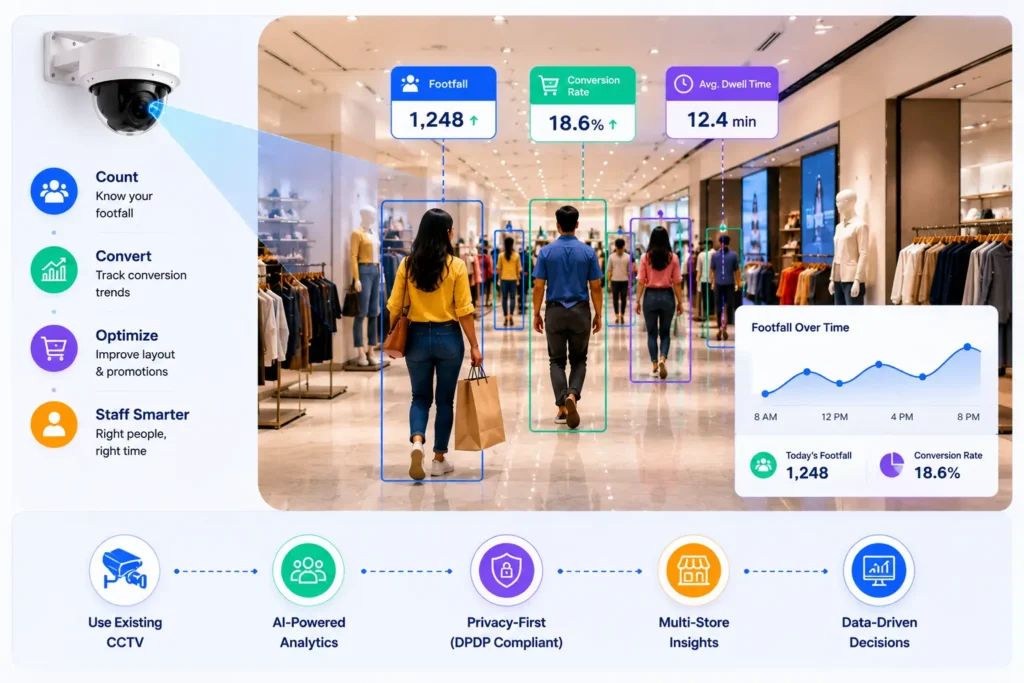
    An entrance camera detects and counts people crossing a virtual line; in-store cameras segment the floor into zones and measure how long shoppers dwell in each.

    Because the analytics run on the video stream, the same infrastructure that records for security now produces operational intelligence.

    This camera-agnostic, retrofit approach is the fastest path to value — there is no rip-and-replace, and most stores can be live in days rather than months.

    For a deeper primer on the underlying technology, see our guide to what AI video analytics is and how it works, and the practical walkthrough of footfall counting on existing CCTV.

    Accuracy in Indian stores depends on a few real-world factors: camera height and angle at the entrance, glass-frontage glare in mall units, and crowding during peaks.

    A good deployment tunes counting lines per store rather than applying one template across the estate, and validates counts against manual spot-checks in the first weeks.

    The metrics that actually drive decisions

    Footfall on its own is a vanity number. The metrics that change behaviour are the ones that connect traffic to outcomes:

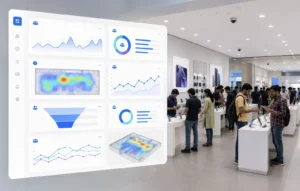
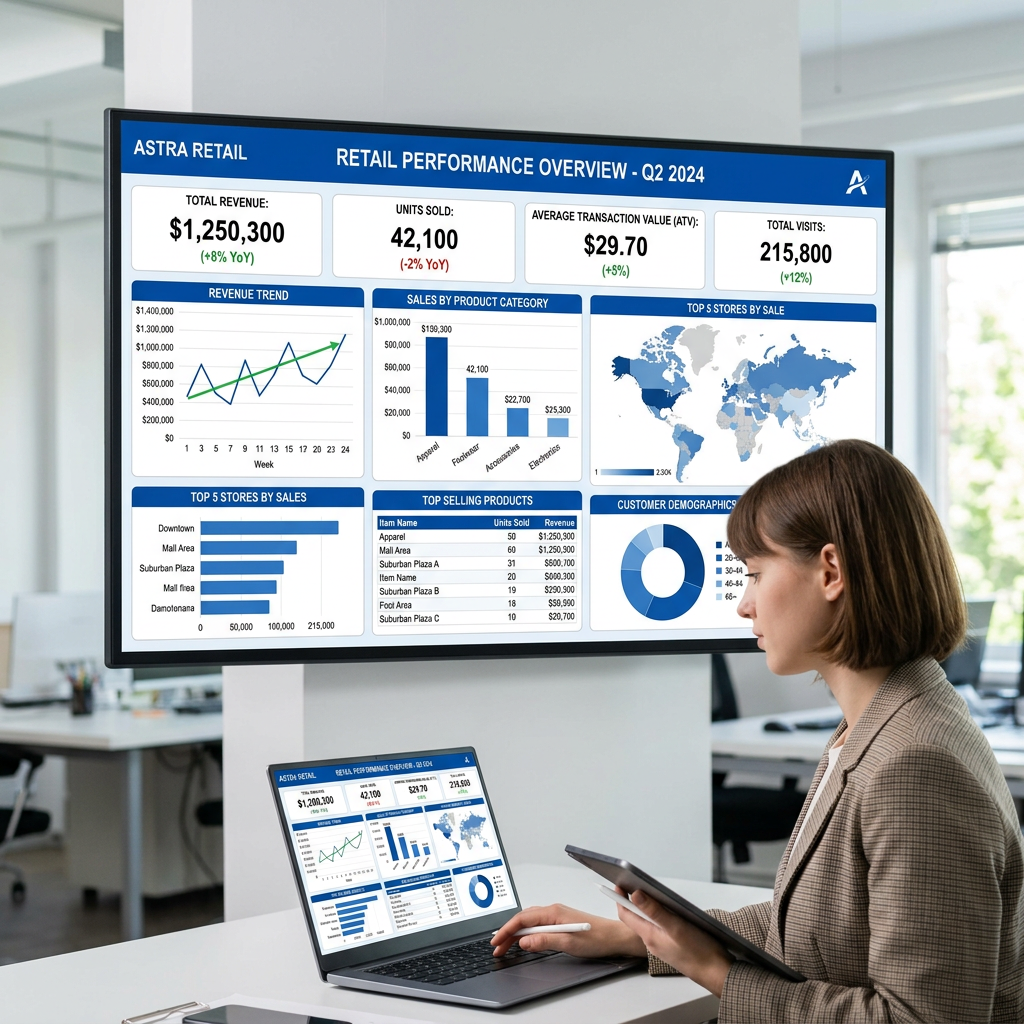
    Business analyst reviewing retail performance dashboard for Q2 2024 with sales, revenue, and demographics data
    A business analyst reviews Astra Retail’s Q2 2024 performance data on multiple screens
    • Entry count by hour and day: the demand curve that drives rostering and break scheduling.
    • Capture rate: the share of mall or high-street passers-by who actually enter — a direct read on your window, signage, and offer.
    • Zone dwell time: where shoppers linger, which tells you whether your best merchandise sits where attention concentrates.
    • Conversion rate: transactions divided by visitors, the single most important number for comparing stores fairly.
    • Staff-to-traffic ratio: whether the floor is covered when demand peaks, or over-staffed when it does not.

    Comparing conversion across a multi-store estate is where the strategy emerges. Two outlets with identical footfall but different conversion reveal exactly where to invest coaching, assortment, or layout changes.

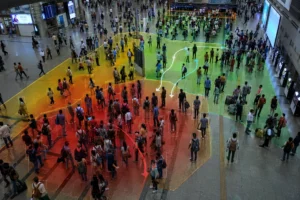
    Heatmaps make the same point visually — if you are new to reading them, our explainer on retail store heatmaps and how to act on them is a useful companion.

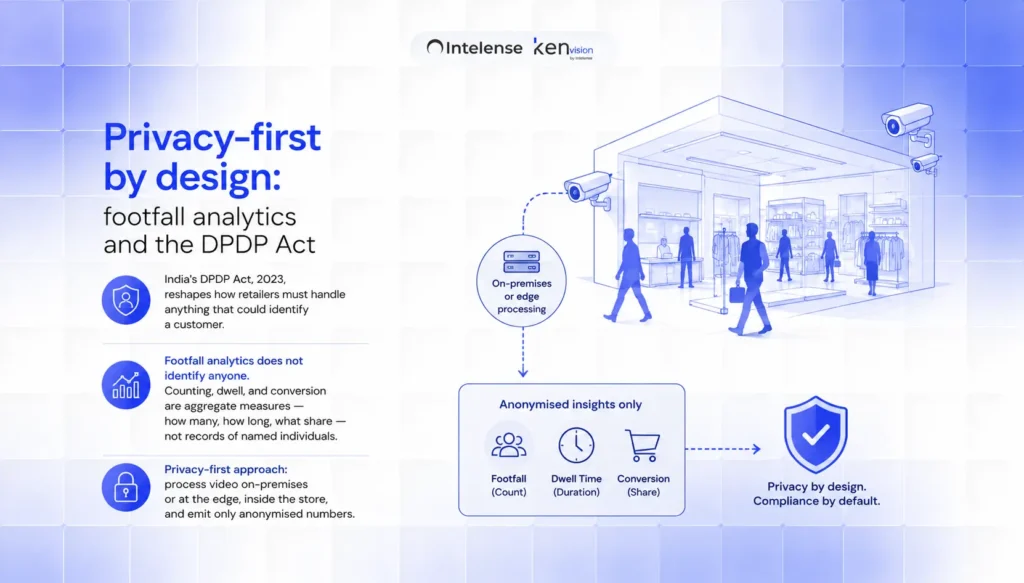
    Privacy-first by design: footfall analytics and the DPDP Act

    India’s Digital Personal Data Protection Act, 2023, reshapes how retailers must handle anything that could identify a customer.

    The good news is that operational footfall analytics does not need to identify anyone. Counting, dwell, and conversion are aggregate measures — how many, how long, what share — not records of named individuals.

    The privacy-first approach that suits Indian retail processes video on-premises or at the edge, inside the store, and emits only anonymised numbers.

    Raw faces never leave the building, identities are not stored, and the analytics layer keeps counts rather than personal data. This on-prem, data-sovereignty-friendly design both reduces DPDP exposure and reassures customers.

    Where demographic breakdowns (such as approximate age band or gender split for a brand activation) are needed, they should be produced as anonymised, non-identifying aggregates rather than profiles tied to a person.

    A practical multi-store rollout sequence

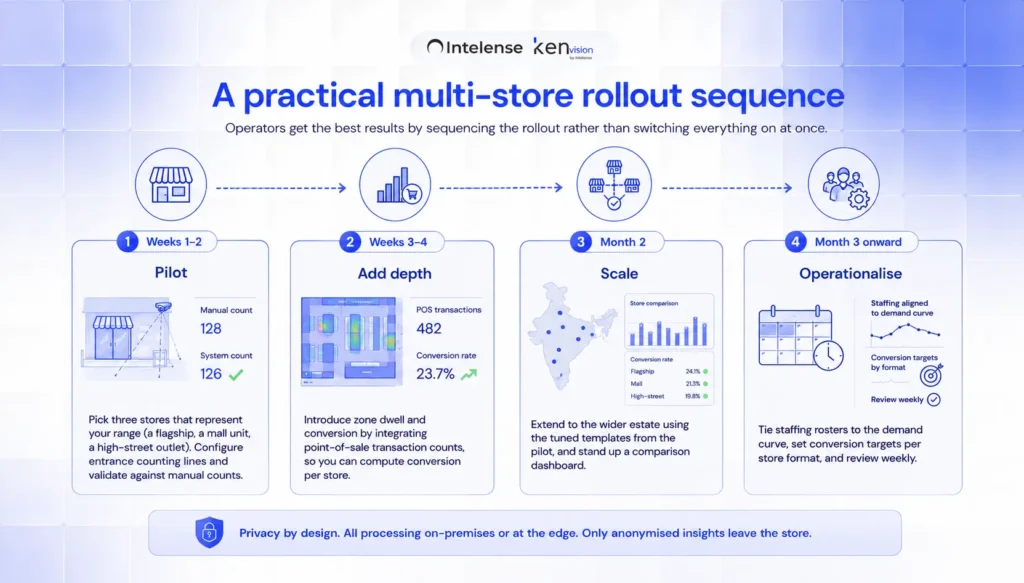
    Operators get the best results by sequencing the rollout rather than switching everything on at once:

    • Weeks 1–2 — Pilot: pick three stores that represent your range (a flagship, a mall unit, a high-street outlet). Configure entrance counting lines and validate against manual counts.
    • Weeks 3–4 — Add depth: introduce zone dwell and conversion by integrating point-of-sale transaction counts, so you can compute conversion per store.
    • Month 2 — Scale: extend to the wider estate using the tuned templates from the pilot, and stand up a comparison dashboard.
    • Month 3 onward — Operationalise: tie staffing rosters to the demand curve, set conversion targets per store format, and review weekly.

    Because the system runs on existing cameras, scaling is largely a software and configuration exercise rather than a capital project — which is what makes estate-wide deployment realistic on a retail timeline.

    You can see how this maps to specific store types on our retail analytics solution page.

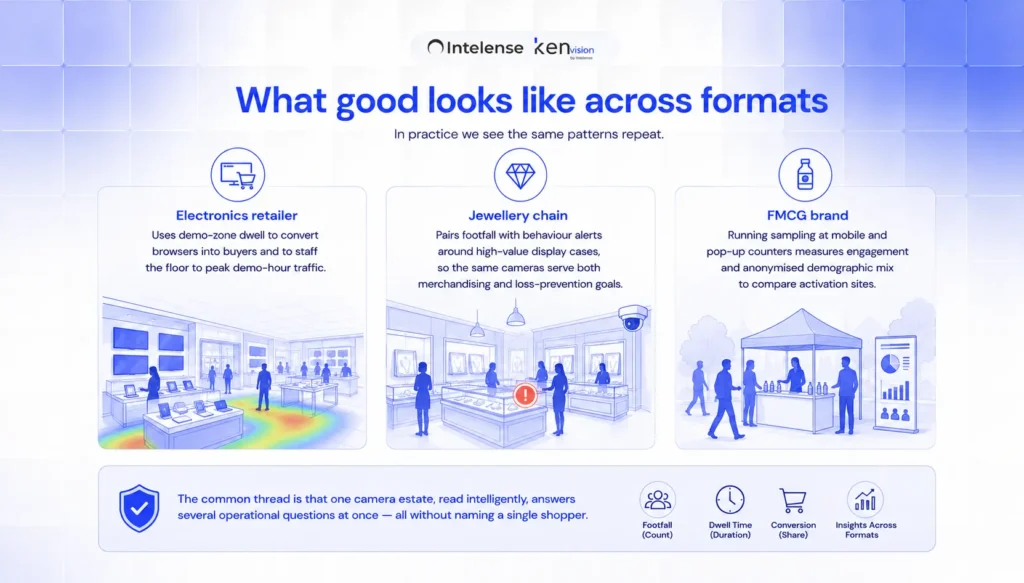
    What good looks like across formats

    In practice we see the same patterns repeat. A national electronics retailer uses demo-zone dwell to convert browsers into buyers and to staff the floor to peak demo-hour traffic.

    A jewellery chain pairs footfall with behaviour alerts around high-value display cases, so the same cameras serve both merchandising and loss-prevention goals.

    A leading FMCG brand running sampling at mobile and pop-up counters measures engagement and anonymised demographic mix to compare activation sites.

    The common thread is that one camera estate, read intelligently, answers several operational questions at once — all without naming a single shopper.

    Getting started

    If you operate retail across Indian cities and your cameras are already in place, you are most of the way to a footfall analytics programme. Start with a focused pilot, prove conversion lift in a handful of stores, and scale on the evidence.

    To see how KenVision turns your existing CCTV into privacy-first footfall, dwell, and conversion intelligence, book a 30-minute demo.

    Frequently asked questions

    Do I need new cameras for retail footfall analytics in India?

    No. The analytics run on your existing CCTV feeds. The approach is camera-agnostic and retrofit-friendly, so most stores go live without buying new hardware, and entrance counting lines are simply tuned per store.

    Is footfall analytics compliant with the DPDP Act?

    It can be designed to be. Operational footfall, dwell, and conversion are aggregate counts rather than personal data. Processing video on-premises or at the edge and storing only anonymised numbers — never identities — keeps the system aligned with DPDP principles. Any demographic breakdowns should be produced as non-identifying aggregates.

    How accurate is camera-based footfall counting?

    With cameras positioned and tuned correctly, modern video AI delivers reliable entry counts suitable for staffing and conversion analysis. Accuracy depends on entrance camera angle, lighting, and crowding, which is why a good rollout validates counts against manual checks during the pilot weeks.

    How quickly can a multi-store chain deploy?

    A representative three-store pilot can be live within a couple of weeks, with estate-wide scaling over the following one to two months. Because it runs on existing cameras, deployment is mostly configuration rather than a capital hardware project.

    What is the difference between footfall and conversion?

    Footfall counts how many people enter; conversion is transactions divided by visitors. Footfall tells you about reach and traffic; conversion tells you how effectively the store turns that traffic into sales — which is the fairer way to compare stores of different sizes and locations.

  • Occupancy Analytics for Commercial Buildings in Canada: A PIPEDA-Safe Guide

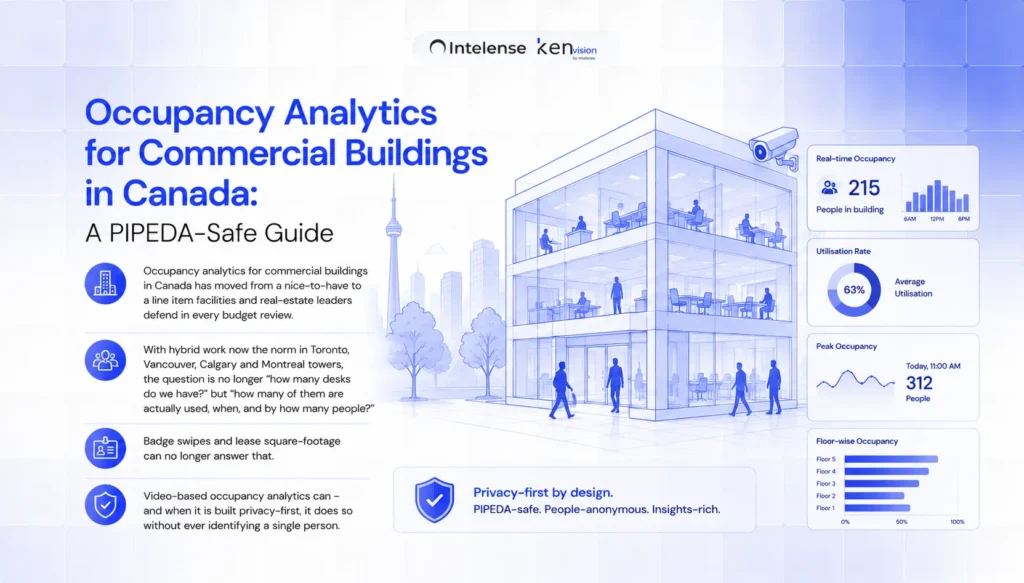
    Occupancy analytics for commercial buildings in Canada has moved from a nice-to-have to a line item facilities and real-estate leaders defend in every budget review.

    With hybrid work now the norm in Toronto, Vancouver, Calgary and Montreal towers, the question is no longer “how many desks do we have?” but “how many of them are actually used, when, and by how many people?” Badge swipes and lease square-footage can no longer answer that.

    Video-based occupancy analytics can — and when it is built privacy-first, it does so without ever identifying a single person.

    This guide explains how AI video analytics turns the cameras already installed in your building into an accurate, real-time occupancy sensor, how that maps onto Canada’s privacy framework, and what to look for before you deploy.


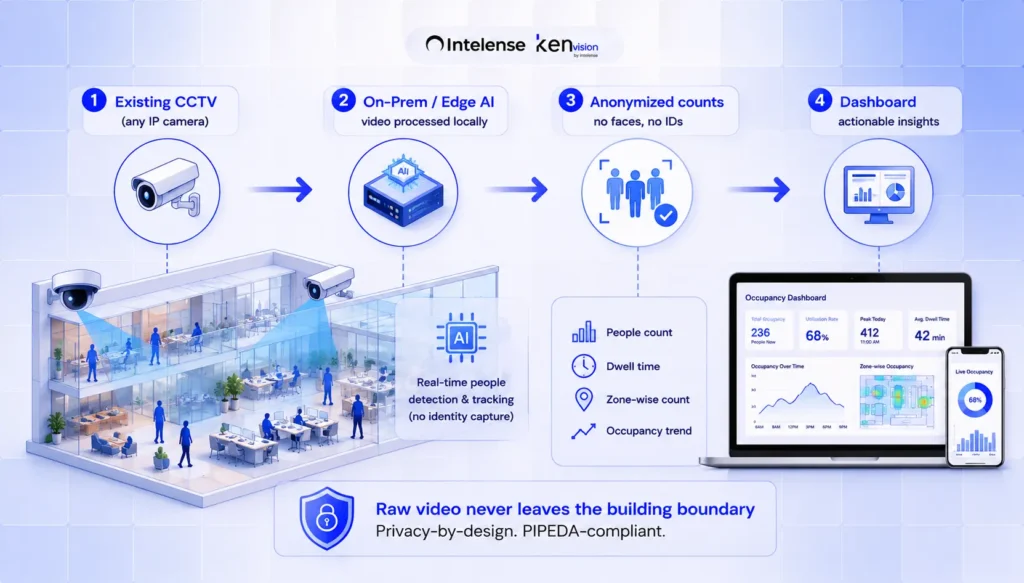
    Existing CCTV
    (any IP camera)

    On-Prem / Edge AI
    video processed locally

    Anonymized counts
    no faces, no IDs

    Dashboard
    Raw video never leaves the building boundary

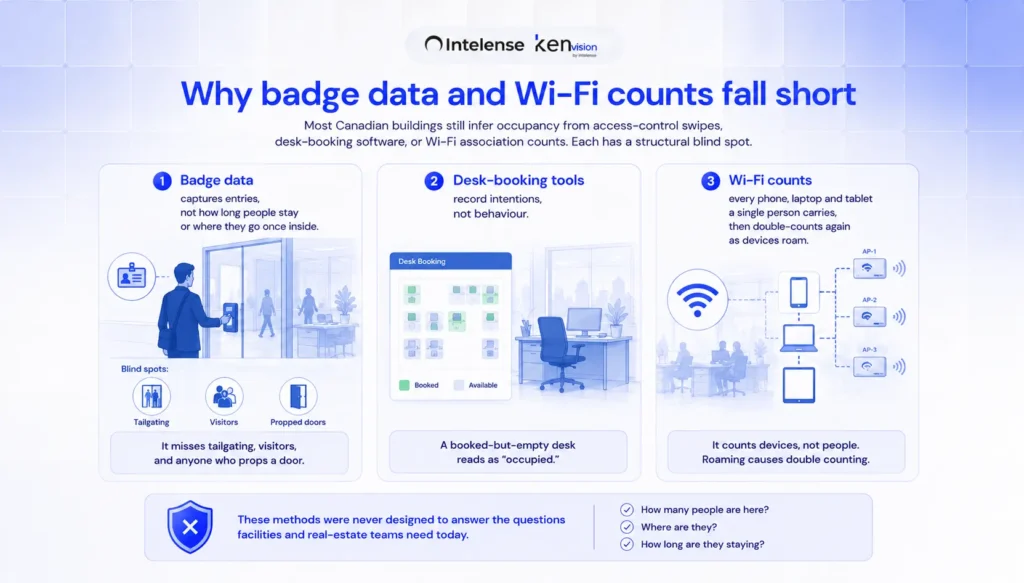
    Why badge data and Wi-Fi counts fall short

    Most Canadian buildings still infer occupancy from access-control swipes, desk-booking software, or Wi-Fi association counts. Each has a structural blind spot.

    Badge data captures entries, not how long people stay or where they go once inside — and it misses tailgating, visitors, and anyone who props a door.

    Desk-booking tools record intentions, not behaviour; a booked-but-empty desk reads as “occupied.” Wi-Fi counts every phone, laptop and tablet a single person carries, then double-counts again as devices roam between access points.

    The result is occupancy figures that are confidently wrong, often by 20–40%. When a single floor in a downtown tower can cost millions a year, decisions about renewals, consolidation and fit-outs deserve a measured number, not an inferred one.

    What occupancy analytics actually measures

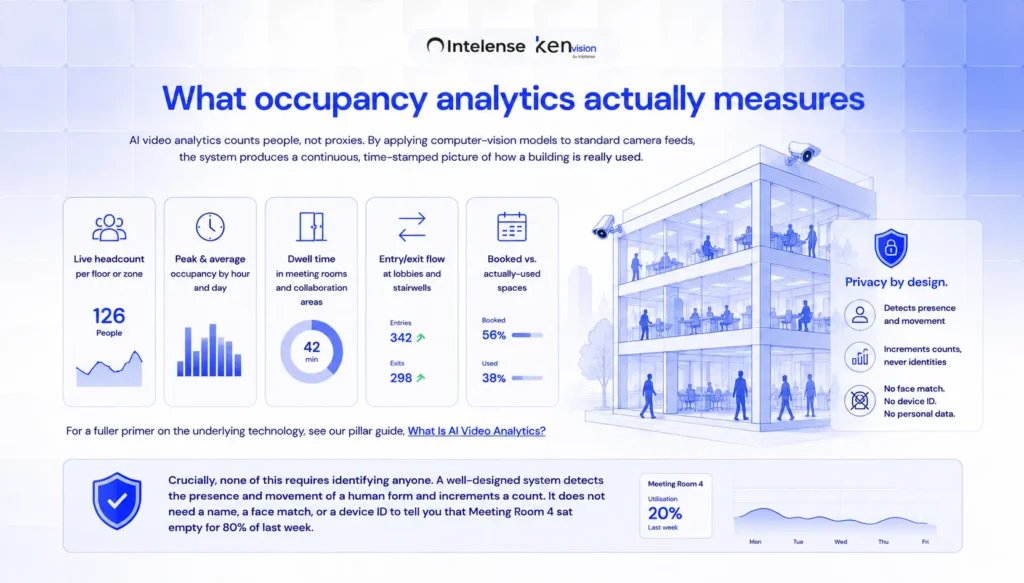
    AI video analytics counts people, not proxies.

    By applying computer-vision models to standard camera feeds, the system produces a continuous, time-stamped picture of how a building is really used: live headcount per floor or zone, peak and average occupancy by hour and day, dwell time in meeting rooms and collaboration areas, entry/exit flow at lobbies and stairwells, and the gap between booked and actually-used spaces.

    For a fuller primer on the underlying technology, see our pillar guide, What Is AI Video Analytics?

    Crucially, none of this requires identifying anyone. A well-designed system detects the presence and movement of a human form and increments a count.

    It does not need a name, a face match, or a device ID to tell you that Meeting Room 4 sat empty for 80% of last week.

    The Canadian privacy context: PIPEDA and beyond

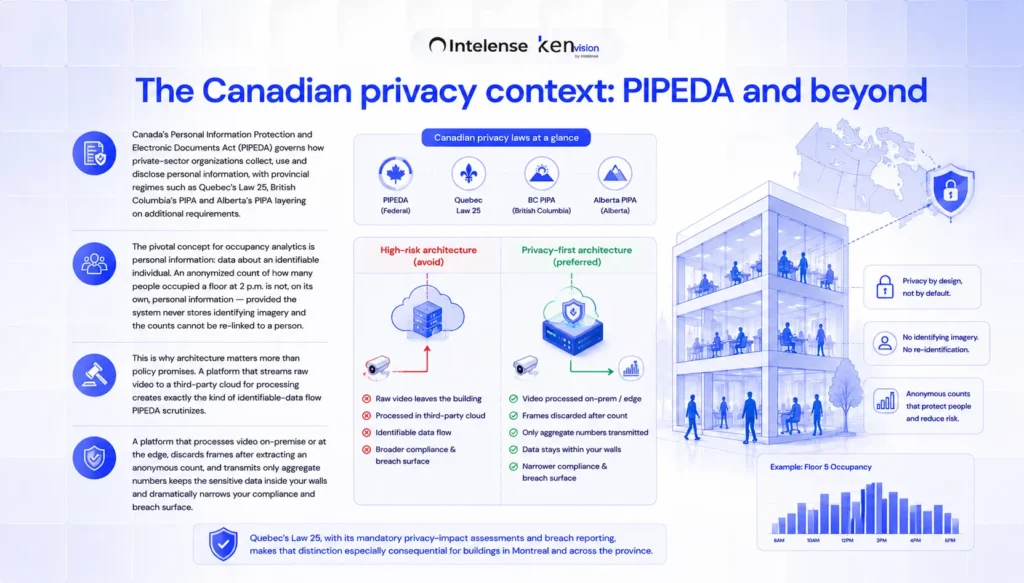
    Canada’s Personal Information Protection and Electronic Documents Act (PIPEDA) governs how private-sector organizations collect, use and disclose personal information, with provincial regimes such as Quebec’s Law 25, British Columbia’s PIPA and Alberta’s PIPA layering on additional requirements.

    The pivotal concept for occupancy analytics is personal information: data about an identifiable individual. An anonymized count of how many people occupied a floor at 2 p.m. is not, on its own, personal information — provided the system never stores identifying imagery and the counts cannot be re-linked to a person.

    This is why architecture matters more than policy promises. A platform that streams raw video to a third-party cloud for processing creates exactly the kind of identifiable-data flow PIPEDA scrutinizes.

    A platform that processes video on-premise or at the edge, discards frames after extracting an anonymous count, and transmits only aggregate numbers keeps the sensitive data inside your walls and dramatically narrows your compliance and breach surface.

    Quebec’s Law 25, with its mandatory privacy-impact assessments and breach reporting, makes that distinction especially consequential for buildings in Montreal and across the province.

    A privacy-first, retrofit-friendly approach

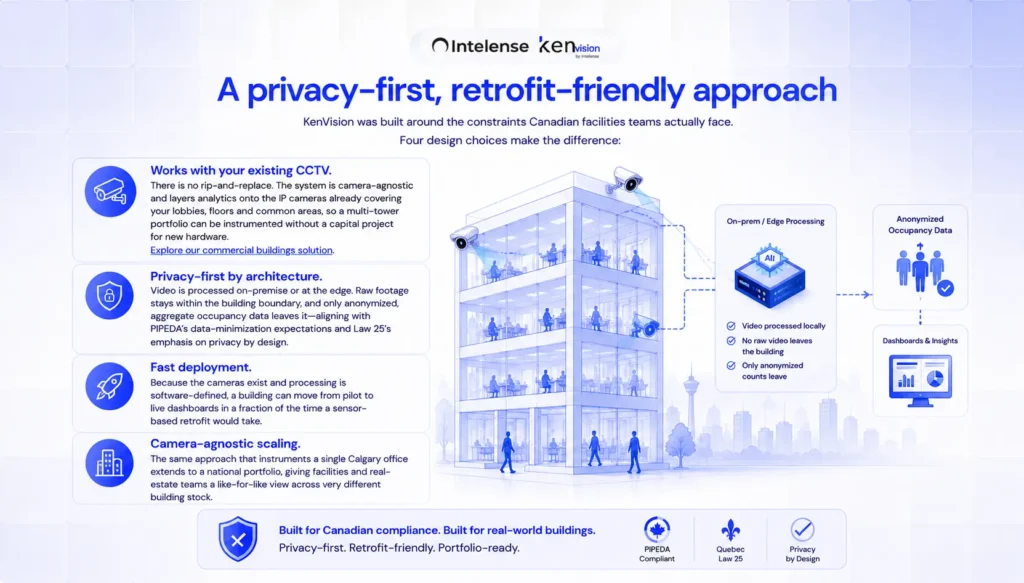
    KenVision was built around the constraints Canadian facilities teams actually face. Four design choices make the difference:

    Works with your existing CCTV: There is no rip-and-replace. The system is camera-agnostic and layers analytics onto the IP cameras already covering your lobbies, floors and common areas, so a multi-tower portfolio can be instrumented without a capital project for new hardware. Our commercial buildings solution is designed specifically for this retrofit path.

    Privacy-first by architecture: Video is processed on-premise or at the edge. Raw footage stays within the building boundary, and only anonymized, aggregate occupancy data leaves it — aligning with PIPEDA’s data-minimization expectations and Law 25’s emphasis on privacy by design.

    Fast deployment: Because the cameras exist and processing is software-defined, a building can move from pilot to live dashboards in a fraction of the time a sensor-based retrofit would take.

    Camera-agnostic scaling: The same approach that instruments a single Calgary office extends to a national portfolio, giving facilities and real-estate teams a like-for-like view across very different building stock.

    What teams do with the data

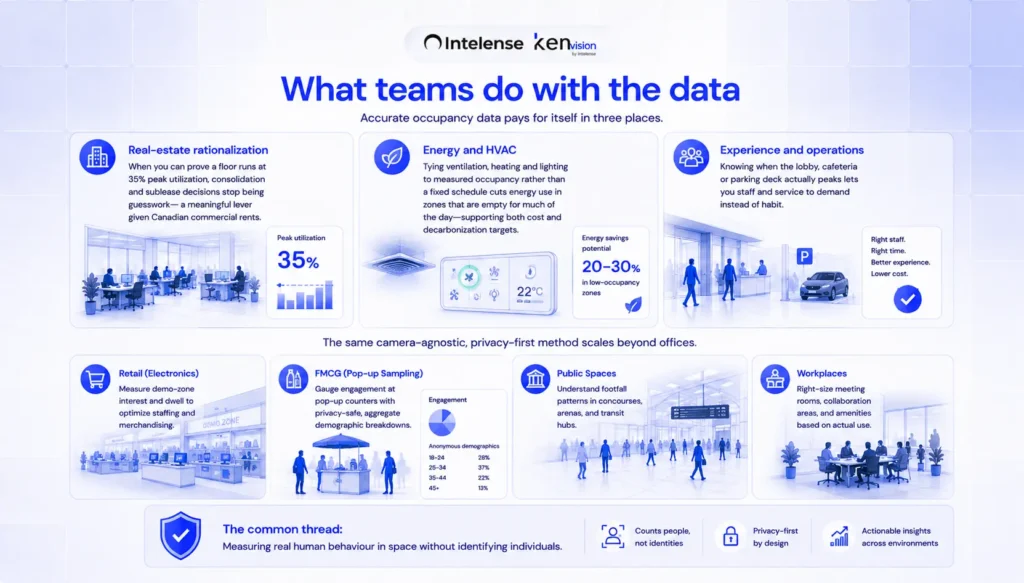
    Accurate occupancy data pays for itself in three places.

    Real-estate rationalization: when you can prove a floor runs at 35% peak utilization, consolidation and sublease decisions stop being guesswork — a meaningful lever given Canadian commercial rents.

    Energy and HVAC: tying ventilation, heating and lighting to measured occupancy rather than a fixed schedule cuts energy use in zones that are empty for much of the day, supporting both cost and decarbonization targets.

    Experience and operations: knowing when the lobby, cafeteria or parking deck actually peaks lets you staff and service to demand instead of habit.

    The same camera-agnostic, privacy-first method scales beyond offices.

    Operators have used comparable approaches to understand engagement and footfall across very different environments — from a national electronics retailer measuring demo-zone interest, to a leading FMCG brand gauging engagement at pop-up sampling counters with privacy-safe, aggregate demographic breakdowns.

    The common thread is measuring real human behaviour in space without identifying individuals.

    Getting started

    A sensible pilot starts with one building or a representative floor, a clear baseline question (“what is our true peak occupancy versus our lease assumption?”), and a short list of zones that matter.

    Because the analytics ride on existing cameras, the pilot is low-risk and reversible. From there, the same configuration template extends across the portfolio.

    See how occupancy analytics would work on your existing cameras — book a 30-minute demo.

    Frequently asked questions

    Is video-based occupancy analytics legal under PIPEDA?

    Yes, when implemented correctly. PIPEDA regulates personal information about identifiable individuals.

    A system that produces only anonymized, aggregate counts — processing video on-premise and never storing identifying imagery — minimizes the collection of personal information.

    Organizations should still complete a privacy assessment, post appropriate notices, and document their data flows, and Quebec operators should account for Law 25’s privacy-impact-assessment requirements.

    Do we need to install new cameras or sensors?

    Generally no. The approach is camera-agnostic and retrofits onto existing IP CCTV, avoiding a rip-and-replace hardware project. Coverage gaps in specific zones can be addressed selectively rather than rebuilding the whole estate.

    How is this more accurate than badge or Wi-Fi data?

    Badge data counts entries, not presence or movement, and misses tailgating and visitors. Wi-Fi counts devices, not people, and double-counts roaming. Video analytics counts the people actually present in a zone over time, which is why it typically corrects occupancy estimates that other methods get wrong by 20–40%.

    Does the system store recordings of employees?

    In a privacy-first deployment, raw video is processed locally and discarded after an anonymous count is extracted; only aggregate numbers are retained. This keeps identifiable data inside the building and reduces both compliance and breach risk.

    How quickly can a building go live?

    Because the cameras already exist and processing is software-defined, deployment is fast — a single building can typically move from pilot to live dashboards far quicker than a sensor-based retrofit.

  • AI Theft Detection for Jewellery Stores in India: Cutting Shrinkage in High-Value Showrooms

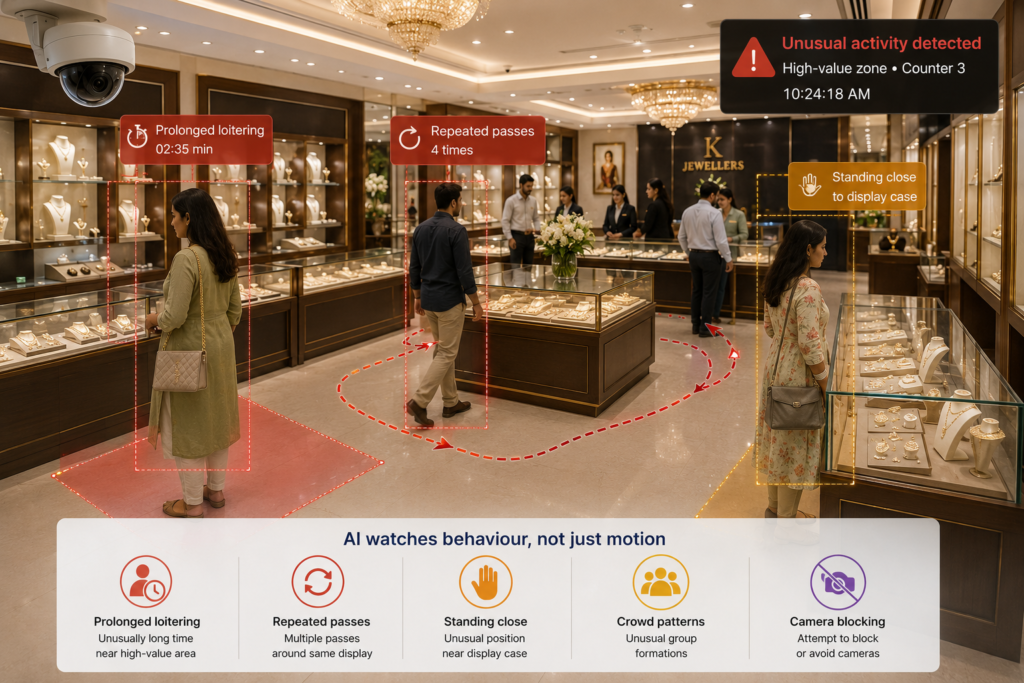
    AI theft detection for jewellery stores in India is moving from a luxury to an operational baseline. Gold and diamond showrooms across the country carry extraordinary value density on the shop floor — a single display tray can hold more stock than an entire FMCG aisle — yet most still rely on a guard, a panic button, and hours of CCTV nobody watches until after a loss. The result is shrinkage that surfaces only at stock-take, and incidents that are reconstructed rather than prevented. AI video analytics changes the timing: it watches every camera continuously and flags suspicious behaviour around high-value cases while it is happening, so staff can respond in the moment.

    This guide explains how AI theft detection works in an Indian jewellery retail context, what it can and cannot do, and how to deploy it without ripping out the cameras you already own.

    Why jewellery retail is a special case

    Most retail analytics is about turning browsers into buyers. Jewellery shares that goal, but it carries a second, heavier mandate: loss prevention on goods where a single item can be worth lakhs. Indian showrooms also run a distinctive operating pattern — long dwell times at the counter, family groups, festival and wedding-season surges, and staff who must handle open stock face to face with customers. That mix makes traditional rules-based security brittle. A motion sensor cannot tell a legitimate try-on from a grab, and a guard watching one entrance cannot see a distraction play unfolding at a side counter.

    AI video analytics is built for exactly this ambiguity. Instead of tripwires, it models behaviour: how long a person lingers at a case, whether multiple people coordinate to occupy staff, when a display is opened and by whom, and whether someone is paying unusual attention to the back of a counter. For a deeper primer on the underlying technology, see our pillar guide, What Is AI Video Analytics?

    What AI theft detection actually watches for

    Suspicious behaviour and loitering

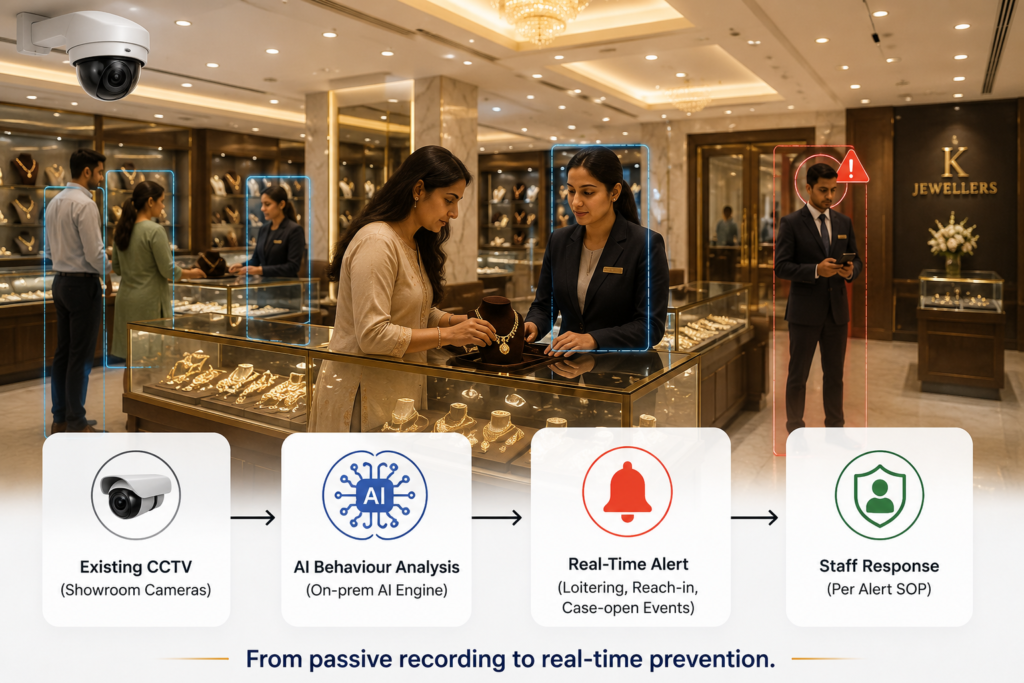
    The system establishes what normal looks like at each zone — entrance, counter, billing, display wall — and surfaces deviations. Prolonged loitering near a high-value case without staff engagement, repeated passes past the same display, or a person positioning to block a camera or a colleague’s line of sight all generate a graded alert rather than a binary alarm.

    Reach-in and case-open events

    Around display cases, the analytics can flag when a case is opened, when a hand crosses into a case that should be staff-controlled, or when an item is removed and not returned within an expected window. These are the moments that matter most, and they are precisely the ones a human monitor misses during a busy Saturday rush.

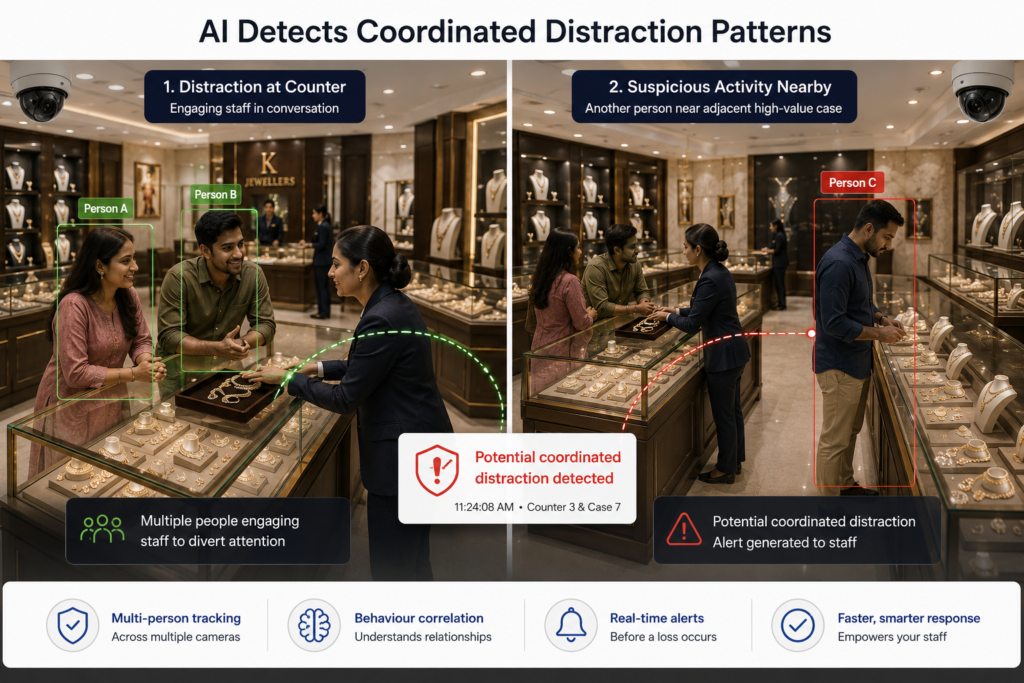
    Coordinated distraction patterns

    Organised theft in jewellery retail frequently relies on splitting staff attention. By tracking multiple people at once across multiple cameras, AI can recognise the signature of a distraction play — one group monopolising a counter while another works an adjacent case — and alert before the second move completes.

    Beyond detection: standardised response

    Catching an event is only half the value. The other half is making sure every alert triggers the same, calm, trained response — not improvisation. A good deployment pairs detection with a written alert SOP so a junior staffer at 11 a.m. responds exactly as the floor manager would. We cover this in detail in Building an Alert SOP for Jewellery Retail, and the case-specific protections in Protecting High-Value Display Cases with Video AI. The combination — reliable detection plus a rehearsed SOP — is what turns analytics into measurably lower shrinkage.

    Privacy and compliance in the Indian context

    Jewellery showrooms handle footage of customers, many of them regulars, and increasingly must account for India’s Digital Personal Data Protection (DPDP) Act when they process that footage. A privacy-first architecture matters here: processing video on-premise or at the edge means raw footage never has to leave the store, faces need not be retained, and demographic or behavioural signals can be derived without exporting identifiable data to a third-party cloud. This keeps data sovereignty in your hands and simplifies the consent and retention story you owe customers and regulators.

    Deploying without a rip-and-replace

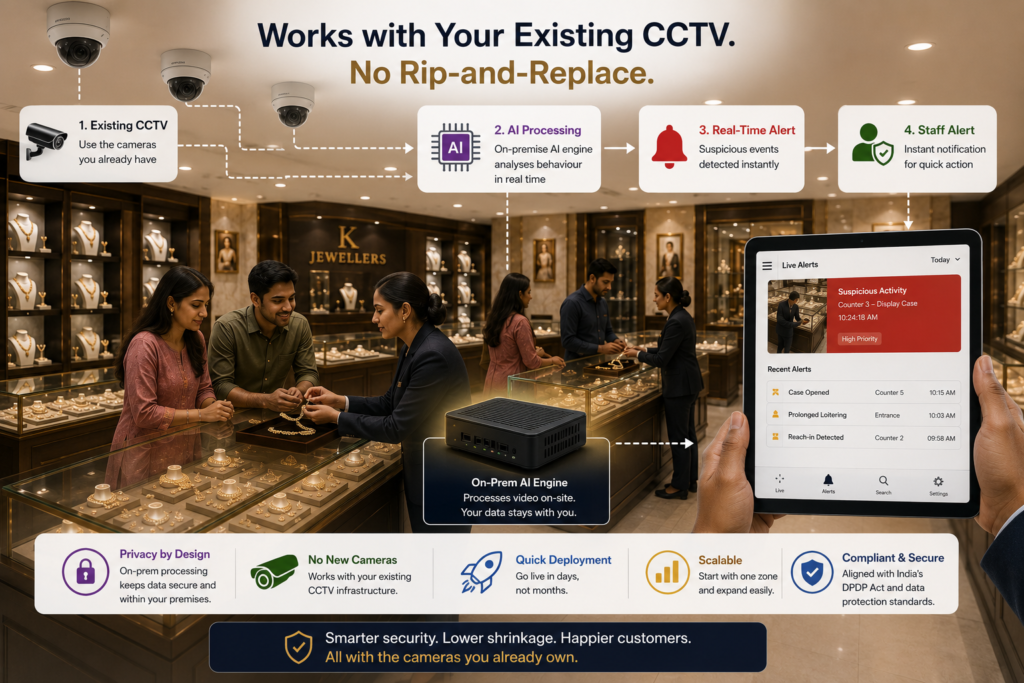
    The biggest myth in jewellery security is that AI means new cameras. It does not. Modern video AI is camera-agnostic and works with the CCTV you already have — the analytics layer sits behind your existing feeds. KenVision is built around exactly this approach: it runs on your current cameras, processes on-prem or at the edge for privacy, and deploys fast so you are not closing the showroom for an integration project. You can explore the broader capability set on our retail analytics solution page.

    A practical rollout usually looks like this: start with the highest-value zone (the diamond or gold display wall), tune the behaviour models to your floor over the first weeks to suppress false alerts, codify the alert SOP with your staff, then extend coverage to billing and entrance zones. Because nothing is being physically replaced, the incremental cost of adding zones is low.

    What to measure

    Treat theft detection like any other operational system and hold it to numbers: alert precision (how many flags are genuine), response time from alert to staff action, shrinkage variance at stock-take versus the prior period, and incident near-misses caught before a loss. Capability claims are easy to make; the showroom that wins is the one that reviews these metrics monthly and keeps tuning.

    Frequently asked questions

    Do I need to replace my existing CCTV cameras?

    No. AI theft detection is camera-agnostic and layers onto the feeds from your current showroom cameras. The analytics engine reads existing video, so there is no rip-and-replace and no extended showroom closure.

    Will customer footage leave my premises?

    With a privacy-first, on-prem or edge deployment, raw footage is processed locally and need not be sent to an external cloud. This supports data-sovereignty expectations and simplifies compliance with India’s DPDP Act.

    Can AI tell a genuine try-on from an actual theft attempt?

    It reasons about behaviour and context — dwell, coordination, case-open and reach-in events — rather than firing on simple motion. This greatly reduces false alarms compared with sensor-only systems, and the models are tuned to your specific floor during onboarding.

    How fast can it be deployed in a working showroom?

    Because it uses existing cameras and processes on-site, deployment is fast and typically starts with your highest-value display zone before extending to billing and entrance areas.

    Does detection alone reduce theft?

    Detection plus a standardised alert SOP is what reduces loss. The alert tells staff something is happening; the SOP ensures every alert gets the same trained, calm response.

    See it on your own floor

    The fastest way to judge whether AI theft detection fits your showroom is to see it run against a real jewellery-retail scenario. Book a 30-minute demo and we will walk through how KenVision works with your existing CCTV, on-prem, with privacy built in.

  • AI Queue Management for Supermarkets in India: Cutting Checkout Abandonment

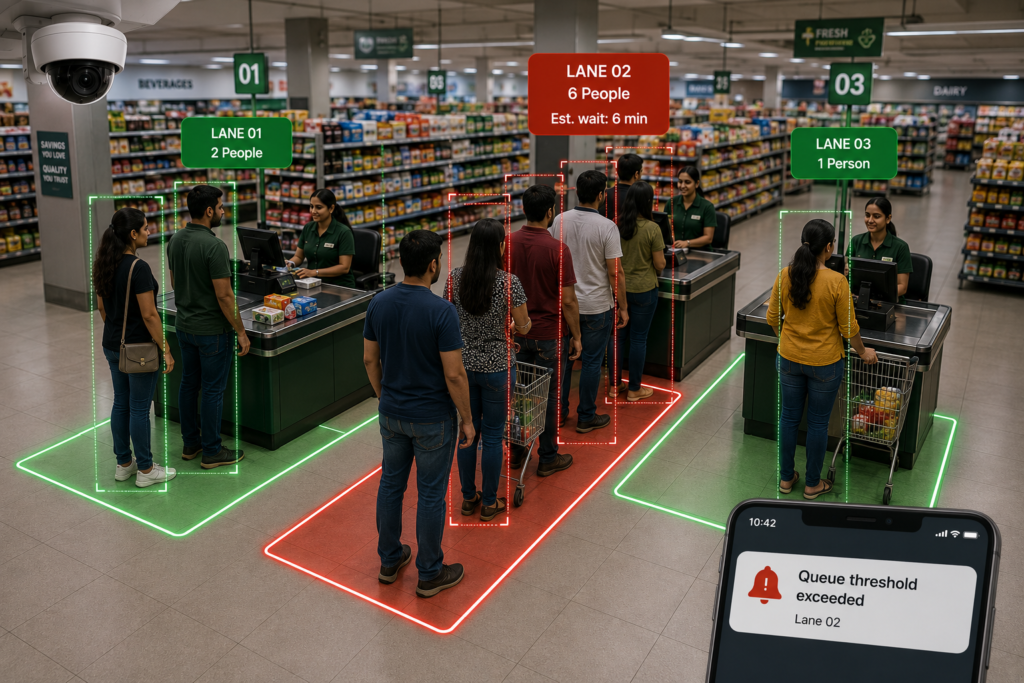
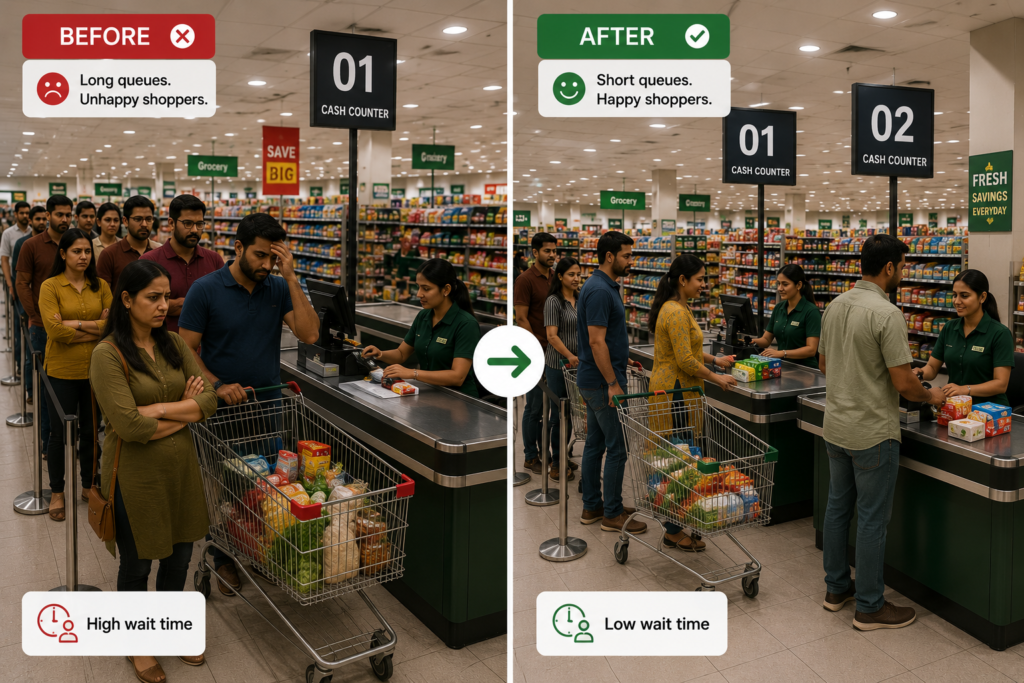
    For Indian supermarkets, the checkout line is where a good shopping trip quietly turns into lost revenue. Shoppers fill a trolley, then balk at a five-deep queue and either abandon the basket or resolve never to return at peak hours. AI queue management for supermarkets turns the cameras you already run into a live sensor for checkout congestion — detecting queue build-up the moment it starts, alerting floor managers before customers walk out, and giving operations leaders the data to staff lanes to actual demand. This guide explains how it works, what it changes on the floor, and how to deploy it without ripping out a single camera.


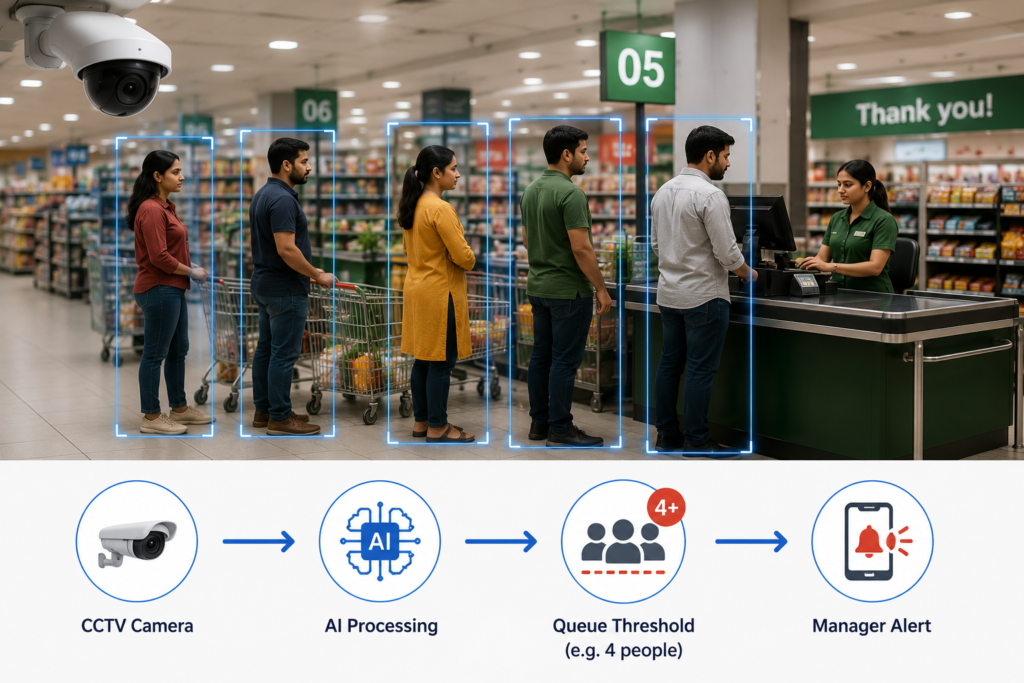
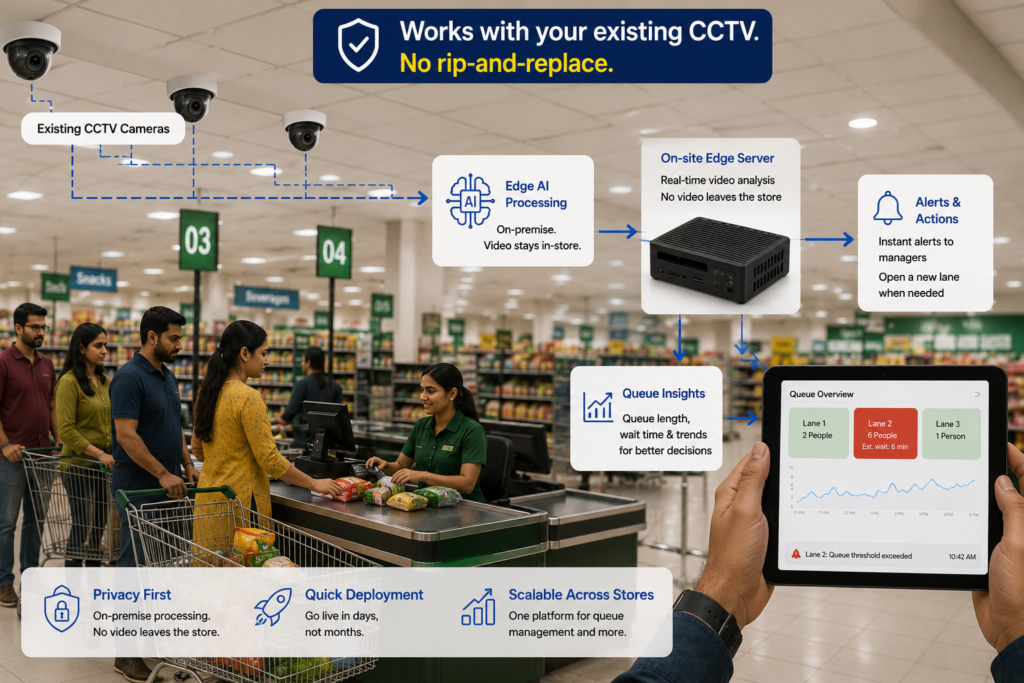
    AI queue management: from camera to staffed lane
    Processing stays on-site — no shopper footage leaves the store.

    Why checkout queues quietly cost Indian supermarkets

    Indian grocery retail runs on thin margins and high footfall, and the checkout is the single most common friction point. Long lines at peak hours — evenings, weekends, and the days around salary credit and festivals — push shoppers to abandon full baskets, switch to a competitor across the road, or shift spend to quick-commerce apps. The damage rarely shows up cleanly in a report: a manager sees the day’s sales, not the trolleys left in an aisle. Queue analytics makes that invisible loss visible by measuring how long lines actually are, how long people wait, and how often congestion crosses the point where customers give up.

    The traditional fixes are blunt. Over-staffing every lane all day destroys labour productivity; reacting only when a cashier radios for help is always too late. What store operations needs is an early-warning system tied to real demand — which is exactly what video AI provides.

    How AI queue detection works

    An AI queue management system applies computer-vision models to the live feed from cameras already pointed at the checkout zone. Rather than recording for later review, the models continuously answer operational questions in real time: how many people are waiting at each till, how the queue is growing, and how long the average shopper has stood in line.

    Queue length and wait-time estimation

    The system counts the people grouped at each checkout and tracks the line over time. Because it watches trends, not just snapshots, it can distinguish a brief cluster from a genuine build-up — and estimate wait time from how quickly the line is clearing.

    Threshold-based alerts

    Operators set a simple rule — for example, “more than four people waiting, or an estimated wait over three minutes.” When a lane crosses that threshold, the system pushes an alert to a floor manager’s phone or a back-office dashboard so a new till can be opened before customers abandon their baskets. The threshold is the lever: tighten it for premium formats, loosen it for high-volume value stores.

    Patterns over time

    Beyond live alerts, the same data builds a picture of when congestion repeatedly hits. That history is what lets a chain roster staff to genuine peaks instead of guesswork, and benchmark one store’s checkout experience against another.

    Why KenVision fits Indian supermarket operations

    KenVision is built for the realities of running stores in India, where camera estates are mixed, bandwidth is uneven, and privacy expectations are rising under the DPDP Act.

    • Works with your existing CCTV. There is no rip-and-replace. KenVision is camera-agnostic and layers analytics onto the cameras already covering your checkout lanes, so you protect prior hardware investment.
    • Privacy-first, on-prem and edge processing. Video is analysed on-site at the edge. The output is a count and an alert — not a library of shopper faces leaving the premises — which keeps you aligned with data-minimisation expectations.
    • Fast to deploy. Because it reuses existing feeds, a pilot can light up in days, not the months a hardware-led project would take.
    • One platform across use cases. The same deployment that watches queues can later cover footfall, dwell, and shrink, so the investment compounds.

    For a broader primer on the technology behind these capabilities, see our overview of AI video analytics, and explore the full retail analytics solution for grocery and supermarket formats.

    Turning queue data into checkout decisions

    The point of measurement is action. In practice, store teams use AI queue management three ways. First, in the moment: alerts trigger a standard response — open a lane, redeploy a packer to bag faster, or route shoppers to a self-checkout bank. Second, in rostering: congestion-by-hour patterns let managers schedule cashiers against the days and time-bands that actually spike, instead of flat all-day cover. Third, at the chain level: comparing queue and wait-time metrics across branches surfaces which stores have a structural checkout problem — too few tills, poor layout, or persistent understaffing — versus a one-off bad day.

    A national grocery operator running this approach can move from anecdote (“the Koramangala store felt slammed on Saturday”) to evidence (“lanes there breach the wait threshold every Saturday 6–8pm, and we are two cashiers short in that band”). That is the difference between reacting and managing.

    Deploying without disruption

    A sensible rollout starts with a single high-traffic store. Identify the cameras already viewing the checkout area, confirm their angles capture the queuing space, and define a first threshold based on what the floor team already knows about their peaks. Run it for a few weeks, tune the threshold against real shopper behaviour, and validate that alerts arrive early enough to act on. Once the response loop is working in one store, the same configuration template extends across the estate — and because processing stays on existing infrastructure, scaling is a software exercise, not a procurement cycle.

    Conclusion

    Checkout abandonment is one of the most fixable losses in Indian grocery retail, because the trigger — a line that grew too long before anyone acted — is now measurable in real time. AI queue management for supermarkets gives floor teams an early warning, gives schedulers real demand data, and gives leadership a like-for-like view across stores, all on the cameras already installed and with processing kept privately on-site.

    See it on your own store footage. Book a 30-minute KenVision demo and we will show you how queue detection works with your existing CCTV.

    Frequently asked questions

    Do we need to buy new cameras for AI queue management?

    No. KenVision is camera-agnostic and runs on your existing CCTV. As long as a camera already views the checkout queuing area at a usable angle, analytics can be layered on without new hardware.

    Is shopper video sent to the cloud?

    Not by default. KenVision processes feeds on-prem or at the edge, so analysis happens inside the store. The system produces counts and alerts rather than exporting raw shopper footage, which supports privacy-first operation under India’s DPDP Act.

    How quickly can a queue alert reach staff?

    Alerts are generated in real time as the queue crosses your chosen threshold and can be delivered to a manager’s phone or an in-store dashboard within seconds, so a new lane can open before customers abandon their baskets.

    How do we set the right queue threshold?

    Start with what your floor team already knows about peak behaviour — for example four people waiting or a three-minute wait — then tune over the first few weeks against actual abandonment patterns. Premium formats usually run tighter thresholds than high-volume value stores.

    Can we compare checkout performance across multiple stores?

    Yes. Because every store reports the same queue and wait-time metrics, you can benchmark branches against each other to find which have a structural checkout problem versus an occasional bad day.

  • Occupancy Analytics for Commercial Buildings in India: Beyond Badge Data

    If you manage office towers, IT parks, or coworking floors in Bengaluru, Mumbai, Gurugram, or Hyderabad, you already have an occupancy number — it just isn’t a reliable one. Badge swipes, Wi-Fi associations, and desk-booking tools each tell a partial story. Occupancy analytics for commercial buildings in India goes beyond badge data by reading what is actually happening in the space: how many people are present, which zones fill up, when peaks hit, and how much of your leased area is genuinely being used. This guide explains how camera-based occupancy analytics works, where badge data falls short, and how facilities teams turn the resulting signal into lower energy bills, smarter leasing decisions, and better workplace experience.


    How Camera-Based Occupancy Analytics Works


    No new cameras. No identity capture. Video processed on site and discarded.

    Why Badge Data Falls Short

    Access-control badges were designed to answer one question — “is this person allowed through this door?” — and they answer it well. They were never designed to measure occupancy, and in practice they understate it badly. In most Indian commercial buildings, one person badges in and holds the door for three colleagues. Visitors, contractors, housekeeping, and cafeteria staff often move through the building without ever swiping. Tailgating is the norm, not the exception. The result is a headcount that can be off by 30% or more on any given floor.

    The other common proxies are no better on their own. Wi-Fi association counts double-count anyone carrying a phone and a laptop, and miss guests on cellular. Desk-booking software tells you what people intended to do, not whether they showed up — a meeting room booked for twelve that seats four is invisible to the calendar. Each source has a blind spot, and stitching them together still leaves you guessing. Occupancy analytics closes the gap by measuring presence directly from the cameras you already have.
    How Camera-Based Occupancy Analytics Works

    The core idea is simple: computer-vision models detect and count people in a camera’s field of view, then aggregate those counts across zones and time. The system tracks how many people are present in a lobby, an open-plan floor, a cafeteria, or a meeting room, and how long they stay. It distinguishes a corridor that people merely pass through from a collaboration zone where they actually settle, using dwell time. Over days and weeks, this produces the three outputs facilities teams care about: real-time headcount, zone-level heatmaps of where people congregate, and a utilization percentage for every leased area.

    Critically, this is a counting task, not a recognition task. Good occupancy analytics counts bodies, not identities — there is no need to know who someone is to know that the third floor is at 80% capacity. That distinction matters enormously for privacy, and it is the foundation of a defensible deployment in India under the Digital Personal Data Protection (DPDP) Act, where minimising the personal data you process is both good practice and good law.

    It Runs on the CCTV You Already Have

    The biggest misconception is that occupancy analytics requires a sensor retrofit — ceiling-mounted people counters at every doorway, thermal arrays in every room. It doesn’t. Modern video AI is camera-agnostic and works with existing CCTV, so the cameras already watching your lobbies, lift bays, and floor plates can do double duty as occupancy sensors. There is no rip-and-replace, no civil work, and no months-long procurement cycle for new hardware. For a facilities team trying to justify a pilot, “use what’s on the ceiling already” is a very different business case from “buy and install a thousand sensors.”

    From Signal to Savings: What You Do With It

    Cut Energy Use with Occupancy-Aware HVAC and Lighting

    Air-conditioning is the single largest controllable cost in most Indian office buildings, and it is routinely run to a fixed schedule that ignores reality — full cooling for a floor that is 20% occupied on a Friday, or for conference rooms sitting empty all afternoon. Feeding live occupancy data into your building management system lets HVAC and lighting follow people instead of the clock. Zones that are empty get setback; zones that fill up get conditioned before they become uncomfortable. In a climate where cooling loads dominate the bill, occupancy-aware control is one of the fastest paybacks in the building.
    Right-Size Your Real Estate

    Commercial rent in prime Indian micro-markets is expensive, and hybrid work has left many organisations paying for space they no longer fill. Utilization analytics gives leasing and workplace teams the evidence to act: which floors are chronically under 40% occupied, which neighbourhoods are oversubscribed at 9:30 but dead by 4:00, and whether a consolidation or a sublease is justified. Instead of negotiating a renewal on gut feel, you walk in with weeks of measured utilization per square foot.

    Improve Experience and Safety

    Live headcount also drives the everyday quality of the workplace. Facilities can position cleaning and pantry staff to actual peaks rather than a generic schedule, surface real-time “is the cafeteria packed right now?” signals to employees, and keep occupancy within fire-safety limits in assembly areas. The same generalized capability is already deployed in adjacent sectors — measuring footfall and dwell in retail, and zone engagement at brand activations — which is to say the underlying people-counting technology is mature and field-proven, not experimental.

    Doing It the Privacy-First Way in India

    Occupancy analytics touches a building full of employees and visitors, so the deployment model matters as much as the accuracy. A privacy-first architecture processes video on-premises or at the edge, inside your own network, and converts each frame into anonymous counts rather than storing or transmitting identifiable footage. Nothing about a named individual needs to leave the building. This aligns directly with the DPDP Act’s principles of purpose limitation and data minimisation: you are measuring occupancy, not surveilling people, and the system is built so that it cannot do the latter even if asked.
    On-prem and edge processing has a practical benefit too — it keeps bandwidth and cloud costs down, and it works even where connectivity to a head office or a foreign cloud region is unreliable or undesirable for compliance reasons. For multinational tenants operating in both India and markets like Canada, the same on-prem model satisfies the stricter of the two regimes by default. (For a deeper comparison, see our guide on regional analytics practice across markets.)

    Getting Started

    The fastest path to value is a focused pilot: pick one or two floors with existing cameras, run occupancy analytics for a few weeks, and compare the measured utilization against what your badge and booking data claimed. Almost every team is surprised by the gap. From there, the obvious next steps are wiring the live signal into your BMS for occupancy-aware HVAC and building a utilization dashboard for the leasing conversation. Because the cameras and the network are already in place, deployment is measured in days, not quarters.

    To understand the broader category and where occupancy fits alongside footfall, queue, and safety use cases, start with our pillar guide, What Is AI Video Analytics?, and explore the full commercial buildings solution from KenVision.

    Ready to see your real occupancy numbers? Book a 30-minute KenVision demo and we’ll show you how to turn your existing CCTV into a privacy-safe occupancy sensor — no new hardware required.

    Frequently Asked Questions

    How accurate is camera-based occupancy analytics compared to badge data?

    Because it counts people directly in each zone rather than inferring presence from door swipes, camera-based occupancy analytics avoids the tailgating, visitor, and held-door errors that make badge counts unreliable. It measures who is actually in a space, including people who never badge in.

    Do we need to install new sensors or cameras?

    No. The technology is camera-agnostic and works with your existing CCTV. The cameras already covering lobbies, floors, and common areas can be used as occupancy sensors, so there’s no rip-and-replace and no civil work.

    Is occupancy analytics compliant with India’s DPDP Act?

    A privacy-first deployment processes video on-premises or at the edge and produces anonymous counts rather than identifying individuals, aligning with the DPDP Act’s data-minimisation and purpose-limitation principles. Footage need not leave your building, and no personal identity data is required to measure occupancy. This is general information, not legal advice — confirm specifics with your compliance team.

    How does occupancy data reduce energy costs?

    Feeding live occupancy into your building management system lets HVAC and lighting respond to actual presence — setting back empty zones and conditioning busy ones — instead of running to a fixed schedule. In cooling-dominated Indian climates, this is one of the fastest-payback uses of the data.

    How long does a deployment take?

    Because it runs on existing cameras and on-prem or edge hardware, a focused pilot on one or two floors can be live in days rather than the months a sensor retrofit would require.

  • What Is AI Video Analytics? A 2026 Guide for Operations Leaders

    AI video analytics is software that turns ordinary camera feeds into structured, real-time data, counting people, detecting events, and surfacing patterns that a human watching a wall of monitors would never catch.

    For operations leaders in 2026, it has quietly become one of the highest-leverage ways to understand what is actually happening across stores, buildings, worksites, and public spaces.

    Instead of treating cameras as a passive record you only review after something goes wrong, AI video analytics makes them an always-on sensor network that feeds your dashboards, alerts, and decisions.

    This guide explains what the technology is, how it works, where it delivers measurable value, and what to look for when you evaluate a platform.

    It is written for the people who own the outcomes — retail ops, facilities, security, and brand teams — not for data scientists.

    What AI video analytics actually does

    At its core, AI video analytics applies computer-vision models to a video stream and converts what the camera sees into numbers and events.

    A traditional camera produces footage. An analytics layer produces answers: how many people entered between 4 and 6 p.m., which aisle held attention the longest, whether a worker stepped into a restricted zone, or whether a queue has grown past four people.

    The footage is still there, but the value shifts from “evidence after the fact” to “insight in the moment.”

    Three capabilities sit underneath almost every use case: detection (finding objects and people in a frame), tracking (following them across frames and cameras), and classification (labelling what is happening — a person, a vehicle, a fall, smoke, a PPE violation).

    Layered on top are counting, dwell-time measurement, zone and line-crossing logic, and anomaly detection.

    Modern systems run many of these models simultaneously on the same feed.

    How it works, step by step

    The pipeline is consistent across vendors even when the underlying models differ.

    A camera streams video into a processing engine — either a small edge device near the camera or a server on-premises. Computer-vision models analyse each frame, identifying and tracking objects.

    That output becomes structured data: counts, timestamps, zones, and event flags. Finally, the data flows into dashboards for trend analysis and into an alerting layer for anything that needs immediate attention.

    The detail that matters most to operations leaders is where the processing happens.

    Edge and on-premises processing means the video is analysed locally and often only the resulting metadata leaves the camera — not the raw footage.

    That is faster, cheaper on bandwidth, and far easier to defend from a privacy standpoint. We go deeper on this in our guide to edge vs. cloud vs. hybrid video AI.

    Where AI video analytics delivers value

    The technology is sector-agnostic, but the wins are concrete. A few patterns we see across live deployments:

    Retail. Footfall counting, store heatmaps, dwell-time-to-conversion analysis, and queue detection turn a store’s cameras into a continuous merchandising and staffing instrument. A national electronics retailer, for example, can measure engagement at demo zones to convert browsers into buyers and align staff to traffic peaks. See how this maps to outcomes on our retail analytics solution page.

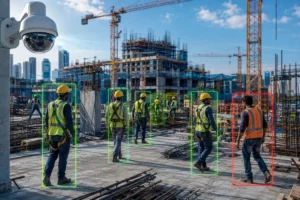
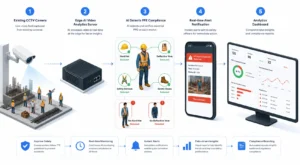
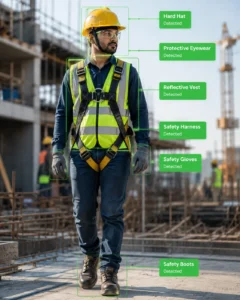
    High-value retail and security – A jewellery chain can use suspicious-behaviour detection and standardized alert-response SOPs around display cases — moving beyond the panic button to proactive prevention. The same building blocks power video surveillance and safety use cases like PPE detection, fire and smoke detection, and perimeter monitoring.
    Brand activations – A leading FMCG brand running product sampling across mobile and pop-up counters can measure engagement and get a privacy-safe, anonymized demographic breakdown of who interacted — without storing identities. That converts a previously unmeasured spend into a campaign you can optimize.
    Buildings and cities – Occupancy analytics inform HVAC and space-utilization decisions, while traffic-flow and crowd-density monitoring support public safety. The common thread is the same: existing cameras, turned into operational data.

    Why “works with existing CCTV” changes the math

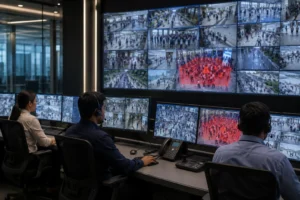
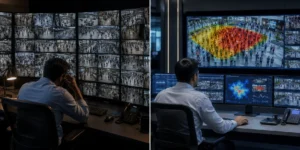
    Security officer watching multiple live video surveillance feeds on screens showing people, vehicle detection, and alerts
    A security officer monitors live video analytics in a control room with multiple surveillance feeds.

    The single biggest misconception is that AI video analytics requires new, specialized cameras.

    The strongest modern platforms are camera-agnostic and retrofit onto the CCTV you already own — no rip-and-replace.

    That collapses both the cost and the timeline of getting started, because the capital expense is already on the floor.

    Deployment becomes a software exercise measured in days, not a hardware project measured in quarters.

    If you are evaluating this path, our practical guide to retrofitting AI onto existing CCTV cameras walks through the steps.

    Privacy is a design choice, not an afterthought

    Five individuals walking in a corridor monitored by a security camera on December 10, 2023
    Security camera footage shows five people walking down a hallway.

    Because the technology observes people, privacy has to be engineered in.

    The privacy-first approach is to process video on-premises or at the edge, extract only the metadata you need (a count, a dwell time, an anonymized age/gender bucket), and never export raw footage or biometric identities to the cloud.

    Done this way, you get the operational insight while keeping data inside your own walls — which also simplifies compliance with regimes like India’s DPDP Act and Canada’s PIPEDA.

    The architecture choice and the compliance outcome are the same decision.

    What to look for in a 2026 platform

    AI analytics dashboard displaying revenue forecast, customer lifetime value, acquisition cost, model accuracy, and active alerts
    Real-time AI analytics dashboard showing metrics, model accuracy, and alerts

    When you evaluate AI video analytics, weigh five things: whether it works with your existing cameras; whether it offers on-prem and edge processing for privacy and speed; how fast it deploys; whether it is camera-agnostic across your mixed hardware estate; and whether the analytics map to decisions you actually make rather than vanity metrics.

    A footfall number is only useful if it changes a staffing roster; a heatmap only matters if it moves a display. The best platforms close that loop.

    Getting started

    You do not need a moonshot to begin. Pick one location and one question — “are we losing sales to checkout queues?” or “which demo zone earns the most attention?” — point your existing cameras at it, and let the data settle for a few weeks.

    The clarity of a single well-measured question is usually enough to build the case for rolling out across the estate.

    If you would like to see what your own cameras could tell you, book a 30-minute KenVision demo and we will walk through your specific use case.

    Frequently asked questions

    Is AI video analytics the same as facial recognition?

    No. Most operational analytics — counting, dwell time, queue detection, occupancy — require no identification of individuals at all. A privacy-first platform measures behaviour and patterns anonymously and never builds a biometric identity profile.

    Do I need to replace my existing CCTV cameras?

    Generally not. Camera-agnostic platforms retrofit onto the cameras you already have, which is why deployment can take days rather than a hardware-replacement project of several months.

    Does the video have to go to the cloud?

    No. With edge or on-premises processing, video is analysed locally and typically only anonymized metadata leaves the site. This is faster, uses less bandwidth, and keeps sensitive footage inside your own infrastructure.

    What kinds of results can operations teams expect?

    Outcomes are use-case specific, but the common thread is converting previously invisible activity — footfall patterns, dwell time, queue build-up, safety violations — into data that informs staffing, merchandising, energy, and security decisions in near real time.

    How quickly can we deploy AI video analytics?

    Because it works with existing cameras and runs as a software layer, a focused single-site pilot can typically be stood up in days, with insights accumulating over the following weeks.

  • Retail Footfall Analytics in Canada: A 2026 Guide for Store Operators

    Retail footfall analytics in Canada has moved from a nice-to-have to a baseline operating tool.

    Rising occupancy costs, tighter labour budgets, and shoppers who research online before they walk in mean Canadian store operators can no longer run on POS data alone.

    Point-of-sale tells you who bought; it says nothing about the far larger group who walked in, looked, and left.

    Footfall analytics closes that gap by turning the cameras you already have into a continuous counter of demand, attention, and conversion.

    This guide explains how retail footfall analytics works in a Canadian context, what to measure, how to stay onside of privacy law, and how to get value from the CCTV already mounted in your ceilings.

    For the broader category, see our pillar overview, What Is AI Video Analytics?

    What retail footfall analytics actually measures

    At its simplest, footfall analytics counts how many people enter a store and when. Modern computer-vision systems go much further, distinguishing staff from shoppers, separating entries from exits, filtering out re-entries, and segmenting traffic by entrance. Layered on top of raw counts are the metrics that drive decisions:

    • Conversion rate — transactions divided by visitors, the single most important number most Canadian retailers still do not track in real time.
    • Dwell and zone engagement — how long shoppers linger in departments or in front of specific displays.
    • Peak-hour curves — the hourly and day-of-week rhythm that should drive staff scheduling.
    • Capture rate — for mall and high-street stores, the share of passing traffic that comes inside.

    Anonymous, privacy-safe demographic estimates (broad age band and gender) can also be derived to understand who a category attracts, without ever identifying an individual. Together these turn a store from a black box into a measurable funnel.

    Why 2026 is the inflection point for Canadian retail

    Three forces are converging.

    • First, labour: with minimum wages rising across provinces, every scheduled hour has to be justified, and aligning staff to actual traffic peaks is one of the fastest ways to protect both service and margin.
    • Second, real estate: landlords and head offices increasingly want evidence of foot traffic and capture rate to negotiate rent and justify locations.
    • Third, omnichannel: as more purchase research happens online, the in-store job shifts to conversion and experience — which you cannot improve if you cannot measure it.

    Privacy-first by design: PIPEDA and provincial rules

    Canadian retailers operate under the federal Personal Information Protection and Electronic Documents Act (PIPEDA), and in some provinces under substantially similar laws such as Quebec’s private-sector regime (including Law 25), British Columbia’s PIPA, and Alberta’s PIPA.

    The throughline is consent, purpose limitation, and data minimization.

    The good news for footfall analytics is that well-designed systems are inherently privacy-respecting: they convert video into anonymous counts and trajectories and discard or never store identifying imagery.

    The practical implications for a compliant deployment are straightforward.

    Process video on-premise or at the edge so raw footage never leaves the store.

    Output statistics — counts, dwell times, anonymized demographic bands — rather than face templates or identities. Post clear notice that analytics is in use, as you already do for security cameras.

    KenVision is built around exactly this model: processing can run on local or edge hardware so personal data stays inside your four walls, which makes the data-sovereignty conversation with a Canadian privacy officer far simpler.

    You can read more on the approach in our overview of privacy-first video AI.

    You do not need new cameras

    The most common objection — “we would have to rip out our CCTV” — is usually wrong. Footfall analytics can run on the existing IP cameras most Canadian stores already have, provided they offer a reasonable view of entrances and key zones.

    A camera-agnostic, software-led approach means the analytics layer ingests existing feeds rather than demanding a proprietary sensor at every door.

    That keeps capital cost low, shortens deployment to days rather than months, and avoids the disruption of construction in a live store.

    Where coverage gaps exist — a poorly angled entrance camera, say — you add a single device rather than re-cabling the building.

    From counts to action: what good operators do

    Numbers only matter if they change behaviour. The retailers getting return from footfall analytics tend to run the same playbook.

    They schedule staff to traffic curves, not to habit, so the busiest 90 minutes are never under-covered.

    They set and watch conversion rate by store and by daypart, then investigate outliers — a store with high traffic and low conversion is usually a staffing, layout, or stock problem you can fix.

    They test layout and display changes as genuine experiments, comparing dwell and conversion before and after.

    And for chains, they benchmark locations against each other to spread what works. For a deeper toolkit by use case, see our retail analytics solutions.

    What this looks like in the field

    Real deployments show the range. A national electronics retailer used demo-zone engagement and footfall data to see where browsers clustered and to move staff toward those peaks, converting more lookers into buyers.

    A jewellery chain combined footfall context with suspicious-behaviour alerting around high-value display cases, standardizing how teams respond.

    A leading FMCG brand measured sampling-counter performance across mobile and pop-up locations, including an anonymized age-and-gender read of who engaged.

    The common thread is that the camera infrastructure was already there; analytics simply made it legible.

    A pragmatic rollout sequence

    Start with a single store or a small cluster.

    Confirm camera placement at entrances and two or three priority zones.

    Stand up edge processing, validate counting accuracy against a manual spot-count, and agree the two or three metrics leadership will actually look at — usually footfall, conversion, and peak coverage. Run for a few weeks, act on the first obvious finding (almost always a staffing-to-traffic mismatch), and only then expand.

    This keeps the project honest and the ROI visible before you scale across the network.

    Conclusion

    For Canadian store operators, retail footfall analytics in 2026 is the most accessible lever for improving conversion, right-sizing labour, and defending real-estate decisions — and it can be done in a privacy-first, PIPEDA-aligned way on the cameras you already own.

    The barrier is no longer technology or cost; it is simply deciding to measure the 90% of demand that POS never sees.

    See it on your own store footage. Book a 30-minute KenVision demo and we will walk through what footfall, conversion, and zone analytics would look like on your existing CCTV.

    Frequently asked questions

    Is camera-based footfall counting legal in Canada?

    Yes, when done with proper notice and data minimization. PIPEDA and provincial laws focus on consent, purpose, and not retaining personal information. Systems that output anonymous counts and process video on-premise — rather than storing identities — align well with these requirements. Always post notice and document your purpose.

    Do I need to replace my existing CCTV cameras?

    Usually not. If your IP cameras give a reasonable view of entrances and key zones, a camera-agnostic analytics layer can run on those feeds. You typically only add hardware to cover a specific blind spot.

    What is a good retail conversion rate to aim for?

    It varies widely by category — convenience and grocery run very high, big-ticket and specialty much lower. Rather than chase an industry number, establish your own baseline by store and daypart, then improve against it.

    How accurate is AI footfall counting?

    Modern computer-vision counting at well-placed entrances is highly accurate and validated against manual spot-counts during setup. Accuracy depends mostly on camera angle and coverage, which is why placement review is part of any serious rollout.

    How quickly can footfall analytics be deployed?

    Because it runs on existing cameras with edge processing, a single store or pilot cluster can typically be live within days, with network-wide rollout following once the metrics prove out.

  • AI Video Analytics: Real-Time Insights for Smart Operations

    AI video analytics is software that watches live or recorded camera feeds and turns what it sees into structured, usable data — counts, alerts, patterns, and reports — without a person having to stare at a screen. Instead of treating cameras as passive recorders you only review after something goes wrong, AI video analytics makes them active sensors that understand activity as it happens. For operations leaders in 2026, that shift is the difference between footage you scrub through after the fact and intelligence you act on in seconds.

    This guide explains what AI video analytics actually does, how it works, where it delivers measurable value, and what to look for when you evaluate a platform.

    From recording to understanding

    A traditional CCTV system answers one question: “What happened?” — and only if someone goes looking. AI video analytics answers a more useful set: “What is happening right now, how often does it happen, and where?” The technology applies computer vision and machine learning to each frame, identifying people, vehicles, objects, and behaviors, then converting those observations into numbers and events your team can use.

    The practical payoff is that you stop paying for cameras that only help you in hindsight. The same hardware that recorded an incident can now count your customers, flag a blocked fire exit, measure how long a checkout queue has been growing, or tell you a restricted zone was entered — the moment it matters.

    How AI video analytics works

    Most modern platforms follow the same three-stage pipeline, whether they run on a camera at the edge, on a local server, or in the cloud.

    1. Ingest

    The system connects to your existing cameras, CCTV recorders, or edge devices and pulls in the video stream. Good platforms are camera-agnostic — they work with the hardware you already own rather than forcing a rip-and-replace.

    2. Analyze

    Computer-vision models process the frames in real time, detecting and classifying what they see: a person crossing a line, a vehicle entering a lot, a dwell time exceeding a threshold, smoke developing in a corner. This is where raw pixels become events and measurements.

    3. Act

    The output is delivered as dashboards, reports, and smart alerts. A queue that crosses a threshold pings a floor manager; a weekly heatmap shows which aisles underperform; an anomaly triggers a notification. Your team spends its time on decisions, not monitoring.

    Where it delivers value

    AI video analytics is not one product — it’s a capability that shows up differently across industries. A few of the most common, high-return applications:

    Retail. Count footfall, build heatmaps of where shoppers go, measure dwell time at displays, and catch growing checkout queues before customers abandon their carts. The most valuable retail use cases connect movement to money — for example, separating visitors who browse and leave from those who convert, so you can see exactly where sales are being lost on the floor.

    Commercial buildings and facilities. Measure real occupancy and space utilization, then drive HVAC and lighting from actual usage instead of fixed schedules.

    Smart cities and public spaces. Analyze traffic flow, monitor crowd density for public safety, and understand how transit hubs and plazas are used hour by hour.

    KenVision applies this same engine across retail, commercial buildings, smart cities, and video surveillance — one platform, contextualized per environment. You can see how each plays out on the retail analytics and video surveillance pages.

    Edge, cloud, or hybrid?

    One of the first architectural decisions is where the analysis runs. Edge processing happens on or near the camera, giving the lowest latency and keeping video on-site — important for privacy and bandwidth. Cloud processing scales effortlessly across many locations. Hybrid setups combine both. The right choice depends on how many sites you run, how sensitive your footage is, and how fast you need alerts. A privacy-first, on-premise option matters more than ever for regulated industries and regions with strict data-sovereignty rules.

    What to look for in a platform

    Works with your existing cameras. If a vendor requires you to replace your CCTV, you’re paying twice. The best platforms layer onto the infrastructure you already have.

    Accuracy you can trust. Detection accuracy determines whether alerts are useful or just noise. Ask for real numbers and test on your own footage.

    Real-time, not just retrospective. The value is in acting within seconds. Batch reports are useful, but live alerts are where incidents get prevented.

    Privacy and deployment flexibility. On-premise or edge options for data sovereignty, with cloud available when you want scale.

    Clear ROI. Whether it’s recovered sales, reduced incidents, or energy savings, the platform should map to a number your leadership cares about.

    The bottom line

    AI video analytics turns cameras from a sunk cost into an intelligence layer that runs across security, operations, and customer experience at the same time. The organizations getting the most from it in 2026 aren’t buying more cameras — they’re getting far more out of the ones they already have.

    Want to see what your own footage could tell you? Book a 30-minute KenVision demo and we’ll walk through your use case.

    Frequently asked questions

    Is AI video analytics different from regular CCTV?

    Yes. CCTV records footage for later review; AI video analytics interprets the footage in real time and produces alerts, counts, and reports automatically.

    Do I need new cameras?

    Usually not. Most modern platforms, including KenVision, are camera-agnostic and work with your existing CCTV and edge devices.

    Does it work in real time?

    Yes — the core advantage is acting on events as they happen, typically within seconds.

    Is my video data kept private?

    With on-premise and edge deployment options, video can be processed locally for data sovereignty.

    What industries use it most?

    Retail, workplace and construction safety, commercial real estate and facilities, manufacturing, and smart cities.